


Do you have family history in Aalten or Bredevoort? Are you curious about the address where your ancestors lived, were born or died? With the help of old archives and handy search methods, you can link historic house numbers to contemporary addresses. We’ve put together a step-by-step guide to help you get started!
In some old archives, the addresses of people were recorded. In the past, addresses consisted of the name of the core or hamlet, followed by a house number. Partly because these house numbers have been changed several times over time, they cannot be directly compared with the current street name-house number combinations. 1
Below we explain step by step how you can trace an old address and how you can then trace it back to a contemporary location. Success not guaranteed!
Step 1: Find the old address
There are various (online) sources in which you can find out where a person lived, where he or she was born and where the death took place. Please note that some data is not yet public due to privacy laws. 2
WieWasWie.nl
The website WieWasWie.nl (‘Who Was Who’) contains information about births, marriages and deaths, among other things. But did you know that the search results often also contain a link to a scan of the original deed, including the address at the time?
- Go to: WieWasWie.
- Search by name and filter the results if necessary.
- Click a relevant result, and then click Go to source on the right.
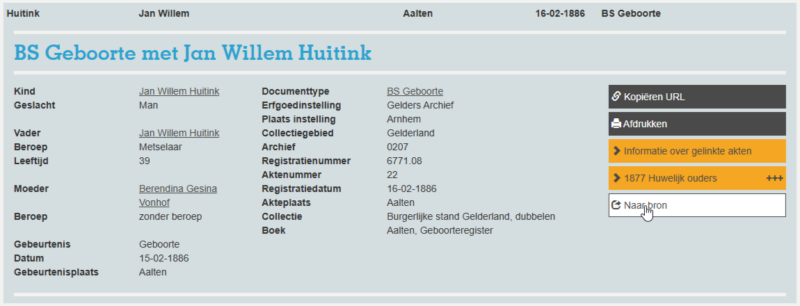
- View the scan and note the house number.
- Sometimes a series of scans will be displayed and you will have to look up the correct record in them. At the top of your screen is the Deed Number. Search the scans for the relevant deed and write down the house number.
- Continue to Step 2.
Heritage Centre Achterhoek and Liemers (ECAL)
On the ECAL website you can find scans of family cards from population registers in the Achterhoek. The public archive contains scans from the period from around 1823 to 1910.
- Go to ecal.nu.
- Enter the Last Name and First Name . Tip: Use wildcards to find any spelling variants as well. 3
- Enter the year of birth in both fields under Period and click on ‘Search’.
- If necessary, filter by City (note: Aalten, Bredevoort and hamlets fall under ‘Aalten’).
- The right-hand column shows the period to which the family card relates. This is important because house numbers can vary from period to period.
- Also check which core or hamlet the map relates to: Click on the relevant line and then on the Inventory number (right mouse button, new tab). Remember the core or hamlet and close the tab.
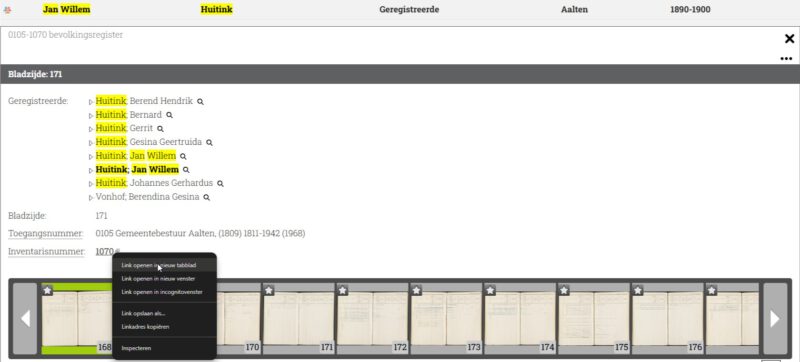
- Open the family card scan.
- Write down the house number and proceed to Step 2.
Régistre Civique (1811–1813)
During the French period, the Régistre Civique was introduced as a precursor to the population register. 4 Many persons included in this register also had their address (house number) mentioned.
- Go to hdcaalten.nl/digitaal-archief
- Download the index of the Régistre Civique Aalten 1811-1813 (pdf).
- Look in the PDF file to see if your ancestor is listed and if there is a house number.
- If so, make a note of the house number and proceed to Step 2.
Older archives
Older sources, such as the Verpondingskohier from 1650 and the Liberale Gifte from 1748, often mention not only the names of the residents, but – if they lived on a farm – also the name of the farm. Many of these farms still exist today and can be found at oudaalten.nl/boerderijen.
Step 2: Find the current address
- Go to oudaalten.nl/huisnummering.
- Choose the relevant core or hamlet.
- Search the table for the correct house number. To make it easier to search, you can sort the table by the relevant year/period.
- If the house number appears, you will find the current address there. If not, the house probably no longer exists. Surrounding house numbers may give you an idea of the approximate location.
Example
Suppose we want to know where Jan Willem Huitink was born in 1886 .
Search by ECAL
- To search we use wildcards and enter the last name : “H*tin?“. We also find possible spelling variants such as Huiting, Huytink, Hoiting and Hoijtink.
- At Period , we enter the year of birth twice.
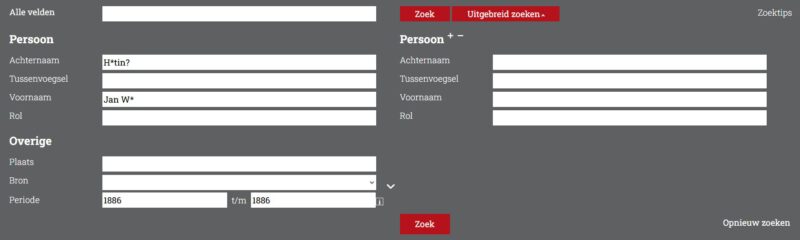
- Click Search.
- In the results we open the family card from 1880-1890 and find the address Bredevoort 158.
Search by Wiewaswie.nl
- His birth certificate can be found on WhoWasWho.
- Right click on Go to source and a new tab will open.
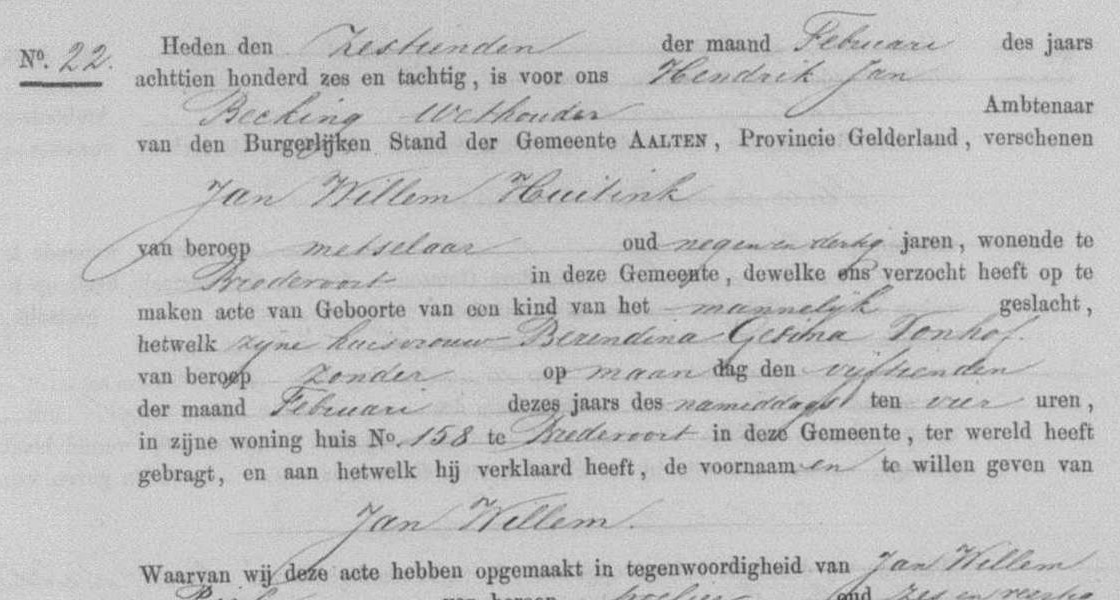
- At the top is a Deed number (in this example: 22). You then have to look up the deed with that number in the scans that are shown below (in this example that is page 11; at the bottom right you will find deed number 22).
- Here you will find the scan of the original birth registration, which shows that Jan Willem was born in house No. 158 in Bredevoort.
Find Current Address
- Go to oudaalten.nl/huisnummering/bredevoort and sort the column by “1880.”
- Here we find that Bredevoort 158 is now Koppelstraat 5 : View address.
The above methods are not exhaustive, because in the archive world several roads lead to Oud Aalten. For the overview, we have outlined the most important steps and done our best to explain everything as clearly as possible. We hope this helps you further. Good luck with your search!